Fast.
Lighter than Lens. #
One Rust Kubernetes core. Two surfaces: a native macOS workspace and k9r for terminal-first flow.
Latest release: v1.4.3. Or download the DMG directly from GitHub Releases.
// Two surfaces
Same core.
Different operating modes. #
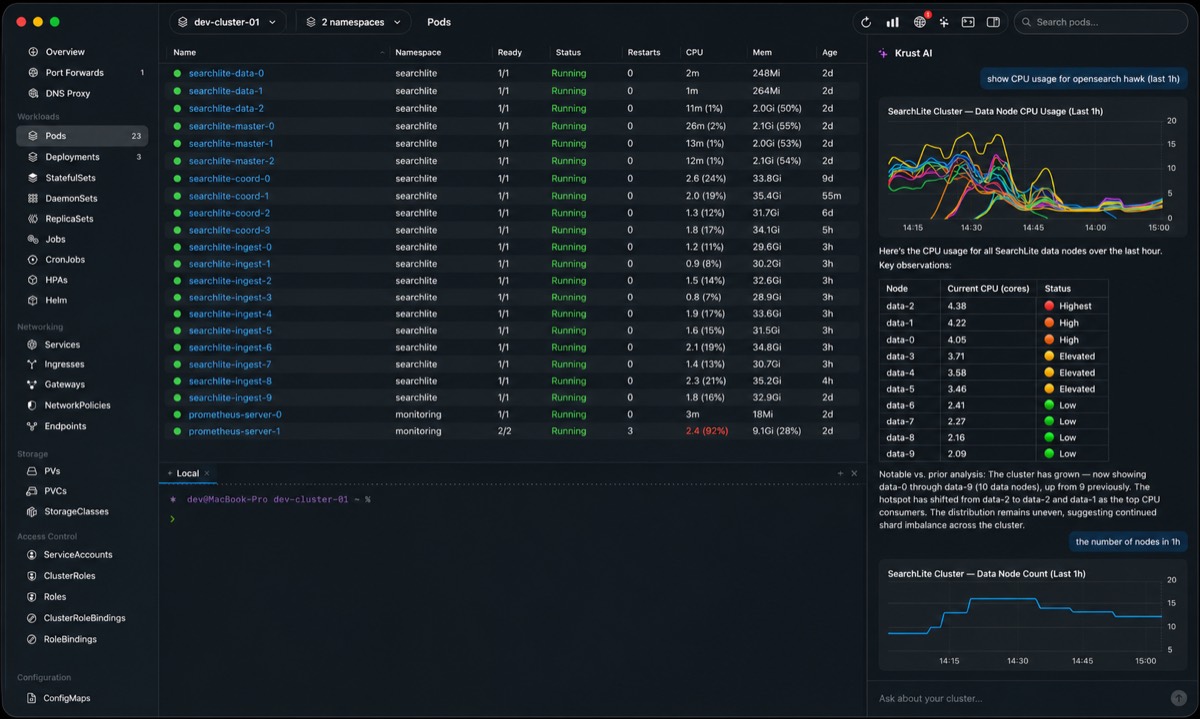
Use Krust when you want a visual macOS workspace. Use k9r when you want terminal-native Kubernetes flow with familiar keys and warm cached state.
Krust macOS
Native desktop UI for inspectors, YAML, logs, Helm, CRDs, topology, AI diagnostics, port-forwarding, and visual incident workflows.
k9r terminal
Keyboard-first terminal UI using the same Rust core, k9s-style navigation, live pod cache, namespace shortcuts, logs, shell, attach, and safe actions.
krust-core
Shared Kubernetes engine for clients, watchers, metrics, logs, YAML, RBAC, topology, CRDs, Helm, exec, and port-forwarding.
// Native core
Fast cluster state.
Rendered natively. #
Krust keeps Kubernetes state warm in Rust and renders macOS-native views for daily production work: logs, YAML, resources, topology, port-forwarding, and diagnostics.
~160MB
RAM for 1,700 pods
1,700+
Pods at 60fps
<1s
Cold start
26MB
App size on disk
0
Config needed
27
Resource types
// The Electron tax
Electron GUIs are
heavy on your Mac #
Electron and web-based GUIs bundle browser runtimes that consume significant CPU and memory — especially noticeable during on-call when you need your machine most.
Krust is a single native macOS binary. Rust handles all Kubernetes API communication and data processing. Swift renders native AppKit/SwiftUI views. No web views, no JavaScript runtime, no garbage collector.
Side-by-side: Krust vs Lens with 1,027 pods
Log Streaming
Logs that keep up
with your services #
Most Kubernetes log viewers struggle with high-volume output or break down when you need to debug a whole workload instead of one pod.
Krust gives Free users a fast single-pod log workflow with filtering, regex, inspector, bookmarks, export, JSON compact, and Cmd+F search. Pro is reserved for incident and hybrid workflows: multi-pod aggregation, deep history search, advanced diff, multiple DNS mappings, and persistent port-forward profiles.
Port Forward + DNS Proxy
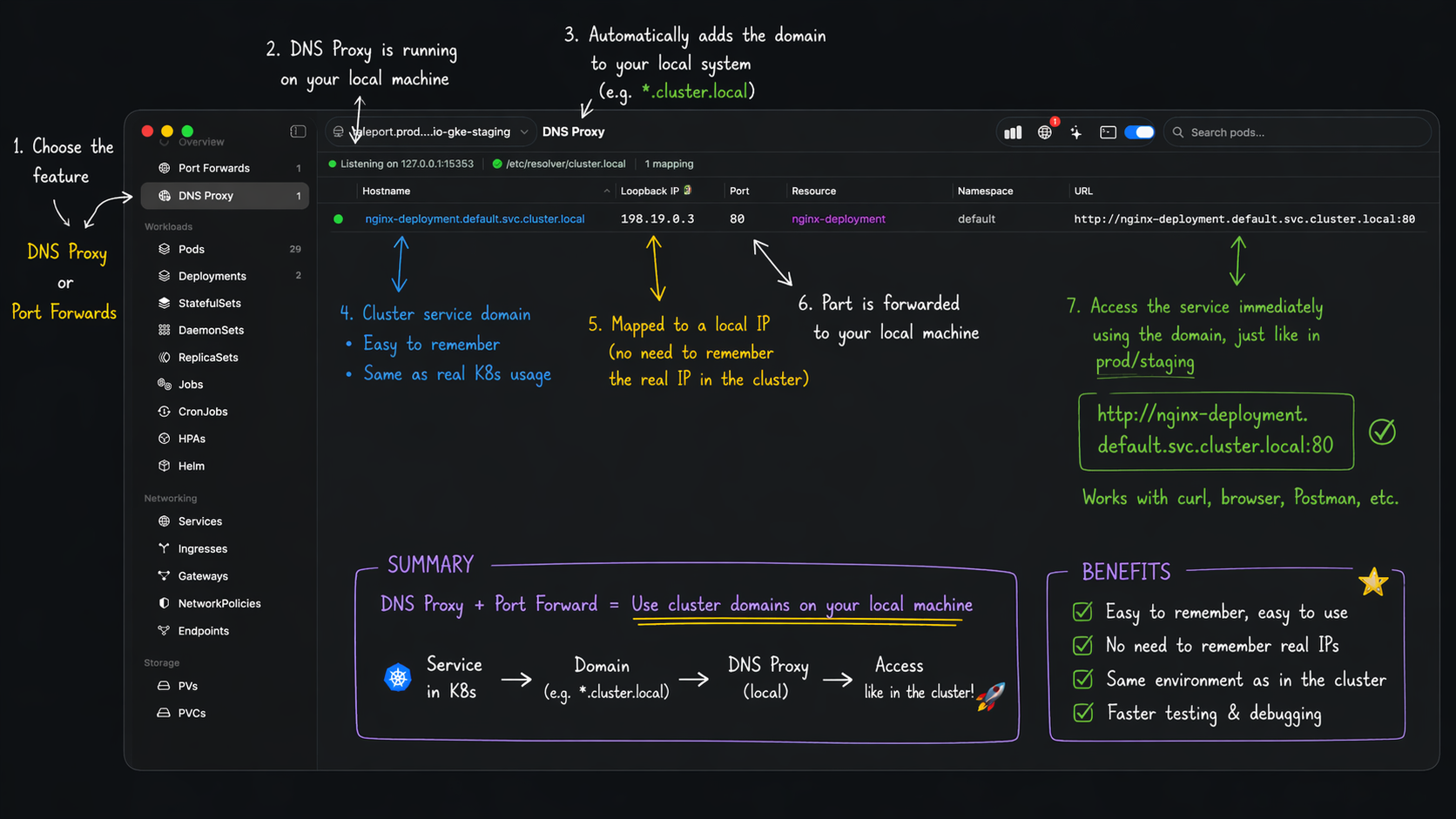
Stable service URLs
for port-forward workflows #
Traditional port-forwarding relies on random localhost ports, which breaks callbacks, local app configs, and team handoffs. Krust adds DNS Proxy + VPN routing so your local domains stay stable while traffic still reaches the right in-cluster workload.
Map friendly names like api.dev.internal to your Kubernetes services, keep one consistent URL across pod restarts, and debug local + cluster traffic from one place.
// Capabilities
Kubernetes management, built for real incident work #
The UI is there to shorten the path from deployment to pod to logs to fix. No waiting room between the screens you need.
27 Resource Types
Pods, Deployments, StatefulSets, DaemonSets, ReplicaSets, Jobs, CronJobs, HPAs, Services, Ingresses, Gateways, ConfigMaps, Secrets, Nodes, Namespaces, CRDs, CR instances, PVs, PVCs, StorageClasses, Roles, ClusterRoles, RoleBindings, ClusterRoleBindings, ServiceAccounts, PDBs, NetworkPolicies, and more.
Real-time Watchers
Every resource type uses Kubernetes watch API. Changes appear instantly without polling.
Native Terminal
SwiftTerm-powered exec sessions with full TTY support. Local shell accessible from any view. Tabbed multi-session.
Smart Log Viewer
Fast single-pod logs are free: filtering, regex, inspector, bookmarks, export, JSON compact, and Cmd+F. Pro unlocks multi-pod aggregation and deep history search when incidents get messy.
YAML Editor + Diff
STTextView-powered editor with line numbers, find bar, and Myers diff. Same-context resource diff is free for normal review workflows.
Port Forwarding
One-click port forward for any workload type. Connection status tracking. Multiple concurrent forwards.
CPU & Memory Metrics
metrics-server integration. Pod-level and workload-aggregated CPU/memory. Graceful degradation.
Multi-Cluster
Switch contexts instantly or view multiple clusters side-by-side. Cross-context diff is Pro; multi-namespace filtering stays free.
Bulk Operations
Multi-select with Cmd+click. Batch delete, restart, scale. Context menus adapt to selection count.
Helm Management
List releases, view history, rollback, upgrade with preview, revision diff. No helm CLI required.
Events & Notifications
Global events timeline. Menu bar badge count. Native macOS notifications for CrashLoopBackOff, OOMKilled, and more.
Revision Diff
Compare any two revisions of Deployments, StatefulSets, or Helm releases. Pro when you need fast change isolation during incident response.
Resource Topology
Interactive ArgoCD-style graph showing resource relationships. Deployment→RS→Pod→Service→Endpoints. Drag nodes, expand subtrees.
AI Diagnostics
Built-in AI agent with tool-calling, persistent memory, diff editor for fixes. BYOK — Anthropic, OpenAI, Gemini, Vertex AI, or Ollama.
Security Audit
31 built-in checks for pod security, RBAC, resource limits, node health, secret exposure, and workload resilience. Trivy CVE integration. SARIF export. Dismiss rules. Free — Lens charges $30/mo.
Smart Filters
Structured filter syntax across all resources: status:crash ns:prod cpu>80. Negation with !, age comparisons, label matching. Autocomplete suggestions as you type.
// Product comparison
Krust vs Lens vs k9s vs Aptakube #
| Krust | Lens | Aptakube | k9s | |
|---|---|---|---|---|
| Engine | Rust + SwiftNative binary | ElectronBundled Chromium | TauriWebView + 5 procs | GoTerminal TUI |
| Memory | ~160 MB1,700 pods · 12 threads | ~1250 MB+ | ~900 MB+ | ~750 MB1,700 pods · 23 threads |
| Large clusters | 1,700+ @60fps | Can slow at scale | Moderate | Terminal limits |
| GUI | Native macOS | Web-based | Web-based | Terminal only |
| Multi-cluster | Side-by-sideWatchers + diff | Switch only | Simultaneous | Switch only |
| Terminal exec | Native TTYSwiftTerm + local shell | xterm.js | None | Built-in |
| Log viewer | 100K bufferFree single-pod workflow, Pro incident logs | BasicExtensions available | Aggregated | BasicNo JSON parsing |
| YAML editing | Editor + diffCross-cluster compare | Editor | Editor + diff | $EDITOR |
| Resource diff | Cross-clusterAny 2 resources | No | Same cluster | No |
| Metrics | CPU + memoryPod & workload level | Via extensions | Built-in | Built-in |
| Port forward | All workloads | Pods only | Pods & services | Built-in |
| CRD browser | CRDs + instances | Via extensions | No | Built-in |
| AI assistant | Built-in11 tools + memory | No | No | No |
| Security audit | 31 checks + TrivyFree — SARIF export | $30/moSecurity Center | No | No |
| Smart filters | Structured syntaxstatus: label: age> cpu> | Text only | Text only | Regex |
| Telemetry | None | Optional | None | None |
| Helm | FullList, rollback, upgrade, diff | Via extension | No | BasicRequires helm CLI |
| Events | Timeline + alertsNative macOS notifications | Basic list | No | Basic list |
| Price | FreePro from $9/mo · Proprietary | Free / $25/mo | From $12/mo | Free (OSS) |
| Platform | macOS | macOS, Win, Linux | macOS, Win, Linux | macOS, Win, Linux |
// Quick setup
Install. Open. Done. #
If kubectl works, Krust works. No sign-up, no cloud account, no cluster agents. Free tier available by default.
Latest release: v1.4.3. Or download the DMG directly from GitHub Releases.
Install
Homebrew cask or DMG. Single .app bundle. Just 26 MB on disk.
Launch
Reads your existing ~/.kube/config. All contexts available instantly.
Go
Real-time watchers connect automatically. Start debugging in seconds.
// Pricing
Pricing for individual engineers #
Most engineers can stay on Free for daily Kubernetes work. Upgrade to Pro only when you need incident workflows and advanced hybrid networking.
See licensing details →
Free plan includes:
27 resource types, real-time watchers, smart filters, metrics, single-pod logs with regex/bookmarks/export, YAML editor + same-context diff, Helm ops, security audit with Trivy + SARIF, AI diagnostics (BYOK), and events timeline.
- ✓ 27 resource types + real-time watchers
- ✓ Single-pod logs, YAML editor, Helm ops
- ✓ Security audit + Trivy + AI diagnostics
- ✓ Multi-pod logs + deep history search
- ✓ Revision diff + cross-cluster diff
- ✓ Multiple DNS mappings + saved port-forward profiles
Need monthly billing? $9/mo
- ✓ Same Pro gates as Yearly
- ✓ One-time payment
- ✓ No recurring bill
Pro gates: multi-pod aggregation, deep history search, revision diff, cross-cluster diff, multiple DNS mappings, and port-forward profiles. Billing cadence only changes price.
Operate Kubernetes from one native desktop app #
From alert to root cause with logs, terminal, YAML diff, and resource context in one workflow. Free tier, no sign-up, no telemetry.