K9r.
Terminal UI for Krust core. #
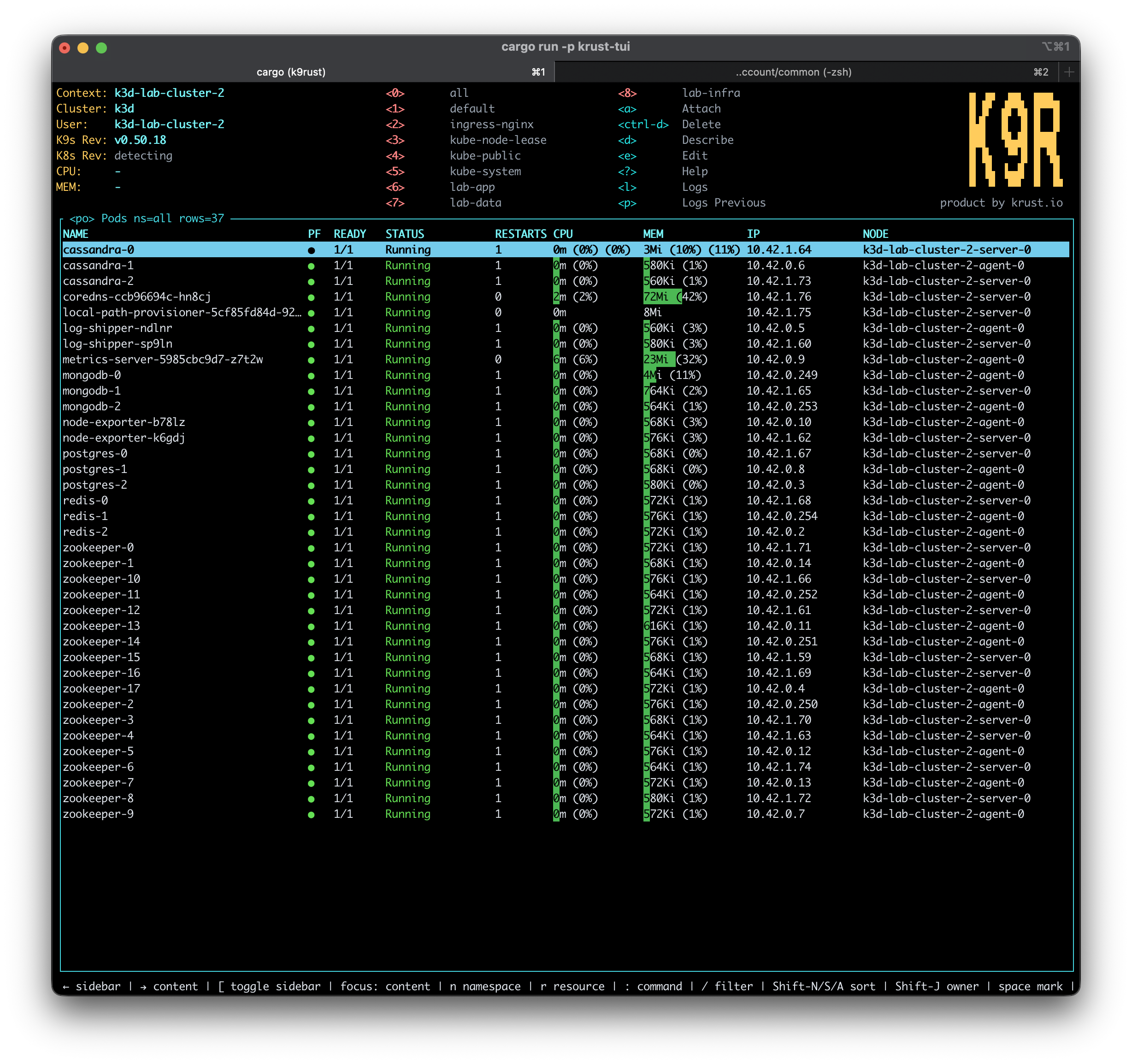
A keyboard-first Kubernetes TUI backed by the same Rust engine that powers Krust: live pod cache, background refresh, k9s-style keys, and terminal-native logs, shell, YAML, and actions.
// Shared engine
Not a rewrite.
A second surface. #
K9r uses the same Rust Kubernetes engine behind Krust. The terminal UI owns layout, selection, commands, and keybindings; Krust core owns Kubernetes clients, watches, stores, logs, YAML operations, Helm, exec, security checks, and port-forward plumbing.
That keeps the product split clean: Krust is the visual macOS app; K9r is the terminal workflow for operators who want speed inside tmux, SSH-style sessions, or a keyboard-only environment.
// Core workflows
A full terminal operating surface #
K9r is not a toy shell around pods. It covers the daily Kubernetes loop: pick context, scan resources, drill into owners, stream logs, edit YAML, open shells, port-forward, and take safe actions without leaving the terminal.
Context + Namespace
Pick kube contexts, switch namespaces, keep recent namespaces close, and jump through command mode without leaving the terminal.
Resource Tables
Browse pods, workloads, services, events, Helm, port-forwards, security, and core cluster resources with grouped navigation.
Live Pods
Pod rows are backed by the Krust watcher and store model, with filtering, table navigation, container drill-down, and status refresh.
Logs
Open pod or container logs, follow the tail, toggle timestamps and wrapping, clear the view, and save logs when you need an artifact.
YAML
View YAML in the TUI, edit with $VISUAL or $EDITOR, dry-run changes, and apply through Krust core.
Shell + Attach
Open pod shell, attach to containers, or start a node debug shell from the terminal flow.
Safe Actions
Delete, restart, scale, rollback, CronJob trigger/suspend, and node cordon/uncordon/drain flows use explicit confirmations.
Port Forward
Start and view active port-forwards from the terminal while reusing Krust's core forwarding model.
// Performance
Warm cache.
Fast terminal flow. #
K9r is fast because it keeps the cluster close. Pods and resources stay warm in a local runtime, and Kubernetes changes stream in continuously. Most navigation reads what K9r already knows instead of stopping to ask the API server again.
That changes how the terminal feels on a noisy cluster: filters respond immediately, workload-to-pod drill-downs do not wait on a round trip, and the UI keeps moving while fresh data arrives in the background.
// Operating loops
Built for terminal muscle memory #
K9r keeps the common Kubernetes loop close to the keyboard: context, namespace, resource, child resources, logs, YAML, shell, attach, and safe actions.
Recent namespaces
Keep the namespaces you touched recently on numeric shortcuts, with all always available first.
Resource drill-down
Enter from workload to pods, pod to containers, and container to logs while preserving the route stack for Escape-back navigation.
Command + filter
Use : for resource jumps and / for table filtering, with autocomplete designed around Kubernetes aliases.
Safe mutations
Delete, restart, scale, trigger, cordon, drain, attach, shell, and edit flows require explicit intent before changing cluster state.
// Product fit
Choose the surface
that matches the work. #
Krust, k9r, and krust-core are the same product family with different responsibilities: visual desktop workflows, terminal workflows, and shared Kubernetes engine behavior.
| K9r terminal | Krust macOS | krust-core | |
|---|---|---|---|
| Interface | Terminal UIKeyboard-first flow | Native macOS GUIVisual incident workspace | Rust libraryShared engine and APIs |
| Best for | Fast terminal navigation, logs, shell, attach, YAML, and safe actions | Inspectors, topology, multi-window debugging, AI diagnostics, and desktop workflows | Watchers, caches, metrics, logs, RBAC, topology, CRDs, Helm, exec, and port-forwarding |
| Key model | k9s-style hotkeysLower relearning cost | Native macOS shortcutsMenus, panels, inspectors | API-firstNo UI assumptions |
| State model | Warm cache/watchRender from local state first | Warm cache/watchShared with visual surfaces | Source of truthKubernetes clients and stores |
| Status | Included with KrustDistributed as the k9r command | Public macOS app | Internal shared core |
| Platform | macOS firstPackaged with Krust | macOS 14+ | Rust core used by Krust and k9r |
Two workflows. One Kubernetes engine. #
Use Krust when you want the full native macOS GUI. Use K9r when you want the same engine compressed into a terminal session.