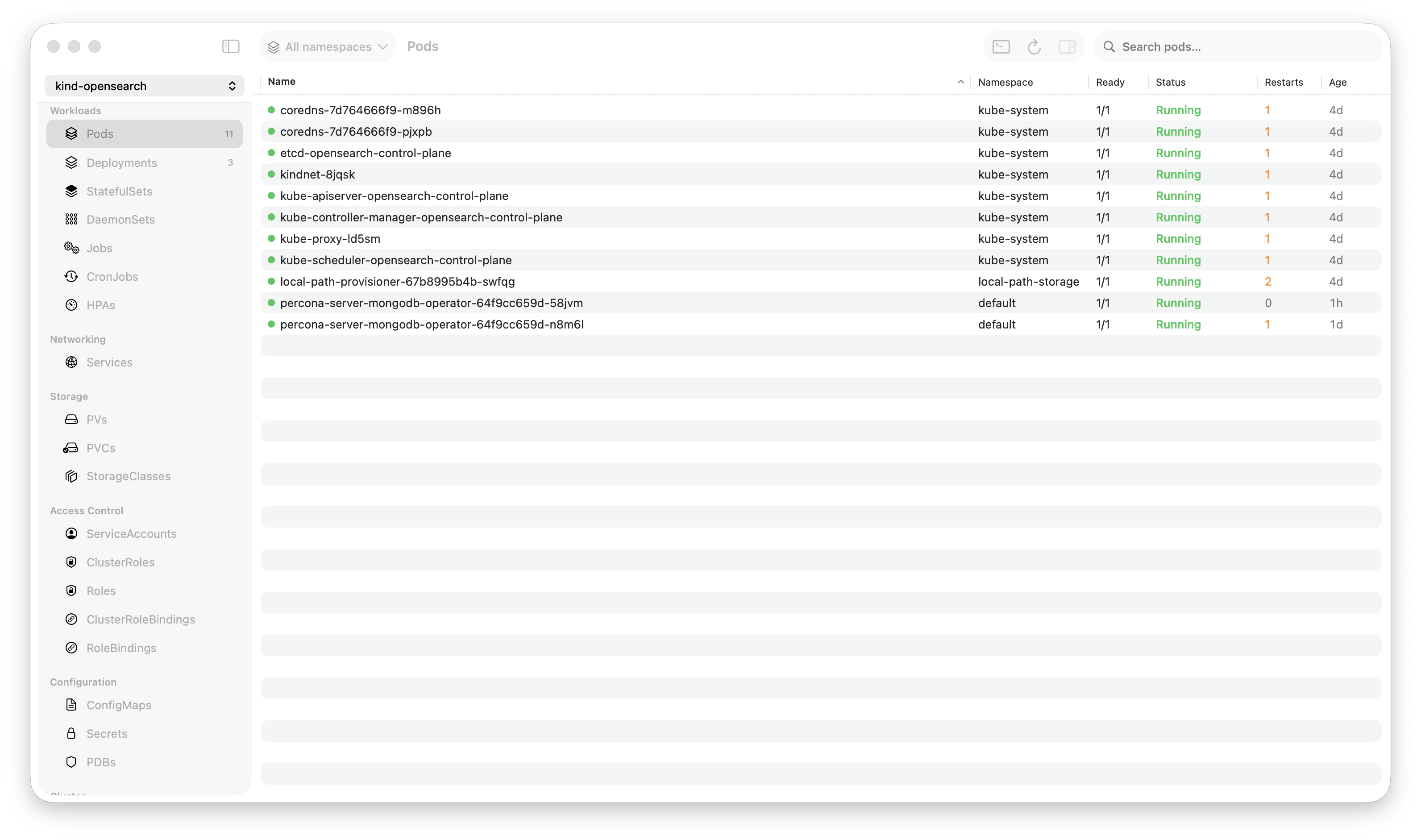
Krust is a native Kubernetes desktop app for production operations on macOS. If you are evaluating tools, compare Features and start with Quick Start.
I was debugging a production incident at 2 AM. My Kubernetes GUI was eating memory, the UI was stuttering, and I couldn’t scroll through logs fast enough to find the root cause.
That night, I thought: What if a Kubernetes GUI was built like Raycast or Arc — native, fast, and designed for macOS?
Six months later, Krust uses 160MB of RAM and searches 200,000 lines of logs in 5 milliseconds.
Here’s why I built it, and what I learned.
The Problem Nobody Talks About
Every Kubernetes GUI today is built on Electron. Lens, the most popular one, is essentially a Chrome browser running a React app. It works — until it doesn’t.
When you’re managing a cluster with hundreds of pods, streaming logs from multiple containers, and jumping between namespaces, Electron shows its limits:
- Memory climbs steadily — start at a few hundred MB, watch it grow as you open more tabs and stream more logs
- CPU spikes during log streaming — your laptop fan becomes your incident soundtrack
- UI thread contention — scrolling through a pod list while logs are streaming? Good luck
I’m not bashing Lens. I used it for years. It’s a great product that made Kubernetes accessible to thousands of engineers. But the architecture has a ceiling, and I kept hitting it during the moments that mattered most — production incidents.
The Decision: Rust + Swift
I had three options:
Option A: Tauri — Rust backend + web frontend. Better than Electron, but still a web view. Still fighting the DOM for table performance. Still not native.
Option B: Go + something — Good for CLI tools (k9s proves this), but Go’s GUI story on macOS is weak.
Option C: Rust + Swift — Rust for the Kubernetes API layer, Swift + SwiftUI + AppKit for the UI. Fully native. No web view. No Chromium. No compromise.
I chose Option C. Not because it was easy — it was the hardest path by far. UniFFI bindings, async runtime bridging, callback patterns across language boundaries. But the performance ceiling is essentially unlimited.
Architecture in 60 Seconds
┌─────────────────────────────────┐
│  Swift / SwiftUI / AppKit       │  ← Native macOS UI
│  NSTableView for pods           │  ← O(visible rows) rendering
│  NSAttributedString for logs    │  ← Off-main-thread building
├─────────────────────────────────┤
│  UniFFI Bridge                  │  ← Auto-generated bindings
├─────────────────────────────────┤
│  Rust Core (kube-rs + tokio)    │  ← Async watchers, not polling
│  100K-line ring buffer          │  ← Full-text search in 5ms
│  In-memory store (RwLock)       │  ← Zero-API-call navigation
└─────────────────────────────────┘
Key design decisions:
-
Watchers, not polling. Kubernetes API supports push-based watches. Krust opens a single watch stream per resource type. When a pod changes, the API pushes the event. No 5-second refresh loops. No wasted API calls.
-
In-memory store. Every resource lives in a
RwLock-protected store. Clicking from Deployments → Pods → Logs involves zero API calls. It’s all in memory, already indexed. Navigation feels instant because it is instant. -
NSTableView for pods. SwiftUI’s
Tablere-renders every row on data change. With 1,500 pods, that’s a problem. I dropped down to AppKit’sNSTableView, which only renders visible rows. O(n) became O(visible), and the table stopped stuttering. -
Logs in Rust. The log viewer keeps 200,000 lines in a Rust ring buffer. Search runs on the Rust side — scanning the entire buffer in 5-15ms. The Swift side only holds 10,000 lines for display, trimmed to 8,000 when exceeded. All
NSAttributedStringbuilding happens off the main thread.
What It Manages
Krust isn’t just a pod viewer. It covers 23 Kubernetes resource types:
- Workloads: Pods, Deployments, StatefulSets, DaemonSets, Jobs, CronJobs
- Helm: List, history, rollback, upgrade, revision diff — no helm CLI needed
- Networking: Services, port forwarding
- Storage: PVs, PVCs, StorageClasses
- Config: ConfigMaps, Secrets, PDBs
- Access Control: ServiceAccounts, Roles, ClusterRoles, Bindings
- Cluster: Nodes, Events, HPA, Custom Resources (CRDs)
Plus a command palette (Cmd+K), pod exec terminal (SwiftTerm), multi-cluster support, cross-cluster diff, and an AI assistant that works with Claude, GPT-4o, Gemini, or Ollama locally.
The Log Viewer Is the Moat
If I had to pick one feature that justifies this project’s existence, it’s the log viewer.
kubectl logs gives you the last few thousand lines and no search. Most GUIs give you a web-based log view that slows down with large volumes. Krust gives you:
- 100K-line buffer with a Rust ring buffer that never drops frames
- Full-text search in 5ms across the entire buffer
- Multi-pod aggregation — stream logs from all pods in a deployment, prefixed with pod names
- JSON parsing — compact mode, field toggle, inspector sidebar
- Log bookmarks — pin important lines, navigate between them
- Log level detection — color-coded error/warn/info/debug with filtering
During a production incident, this is the difference between “let me grep through exported files” and “I can see it right now.”
The Hard Parts
UniFFI callbacks. Rust’s async world and Swift’s main thread don’t naturally get along. Log streaming works via callbacks: Rust spawns a tokio task that streams from the Kubernetes API, and each log line fires a callback into Swift. Getting the threading right — without blocking either runtime — took weeks.
SwiftTerm integration. The terminal emulator (for kubectl exec) uses SwiftTerm. Making it resize correctly, handle ANSI sequences, and synchronize with the WebSocket session required diving deep into both SwiftTerm’s internals and Kubernetes exec protocol.
Metrics without metrics-server. Not every cluster has metrics-server installed. Krust gracefully degrades — when metrics aren’t available, it shows ”-” instead of crashing or spamming errors. When it is available, it polls every 30 seconds with adaptive backoff on failure.
What’s Next
Krust now follows a simple split:
- Free tier: Daily cluster work stays free — resource browsing, single-pod logs, regex, bookmarks, export, Helm, terminal, events, multi-cluster, topology, and diff workflows
- Pro tier: Incident-grade workflows — multi-pod log aggregation, deep history search, revision diff, and cross-cluster diff
I’m building this because I want a Kubernetes tool that feels like it belongs on macOS. Not a web app in a window. Not a terminal with a learning curve. A real, native application that’s fast when it matters most.
If you’re on macOS and manage Kubernetes clusters, give it a try. I’d love your feedback.
[Download Krust →] | [GitHub →]